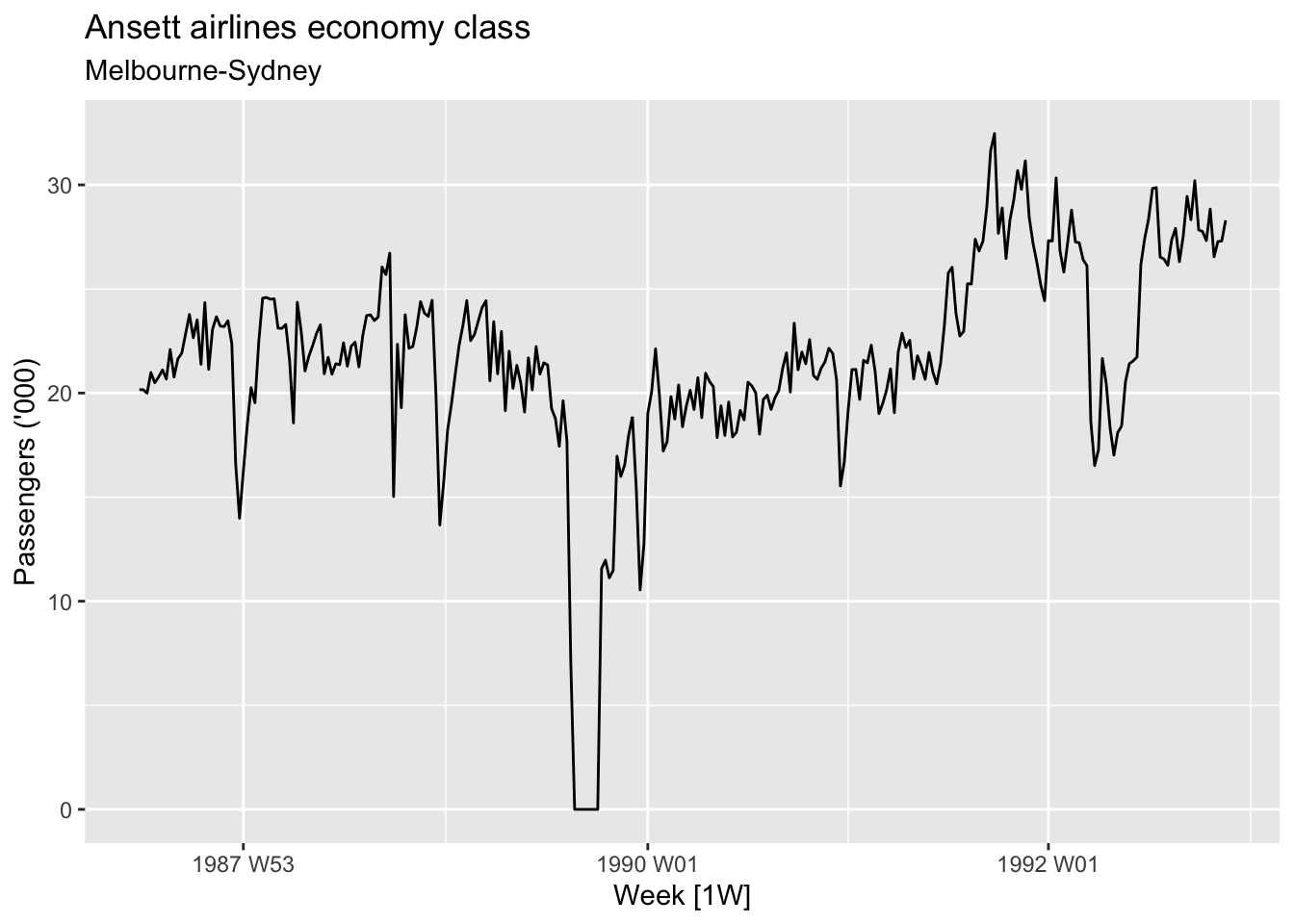
The basic steps in a forecasting task: Step 1: Problem definition Step 2: Gathering information Step 3: Preliminary (exploratory) analysis Step 4: Choosing and fitting models Step 5: Using and evaluating a forecasting model
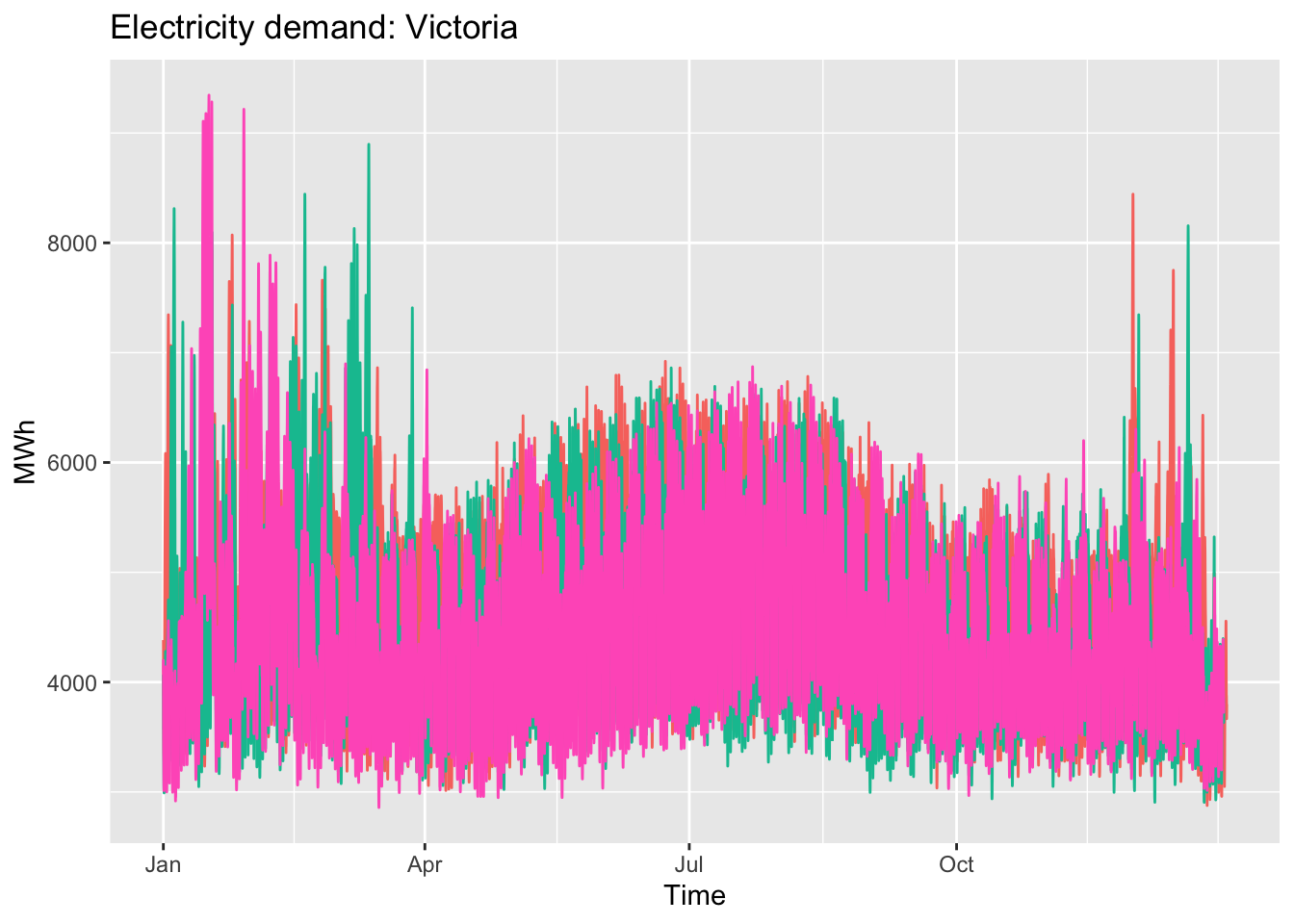
vic_elec |>gg_season(Demand, period ="year") +theme(legend.position ="none") +labs(y="MWh", title="Electricity demand: Victoria")
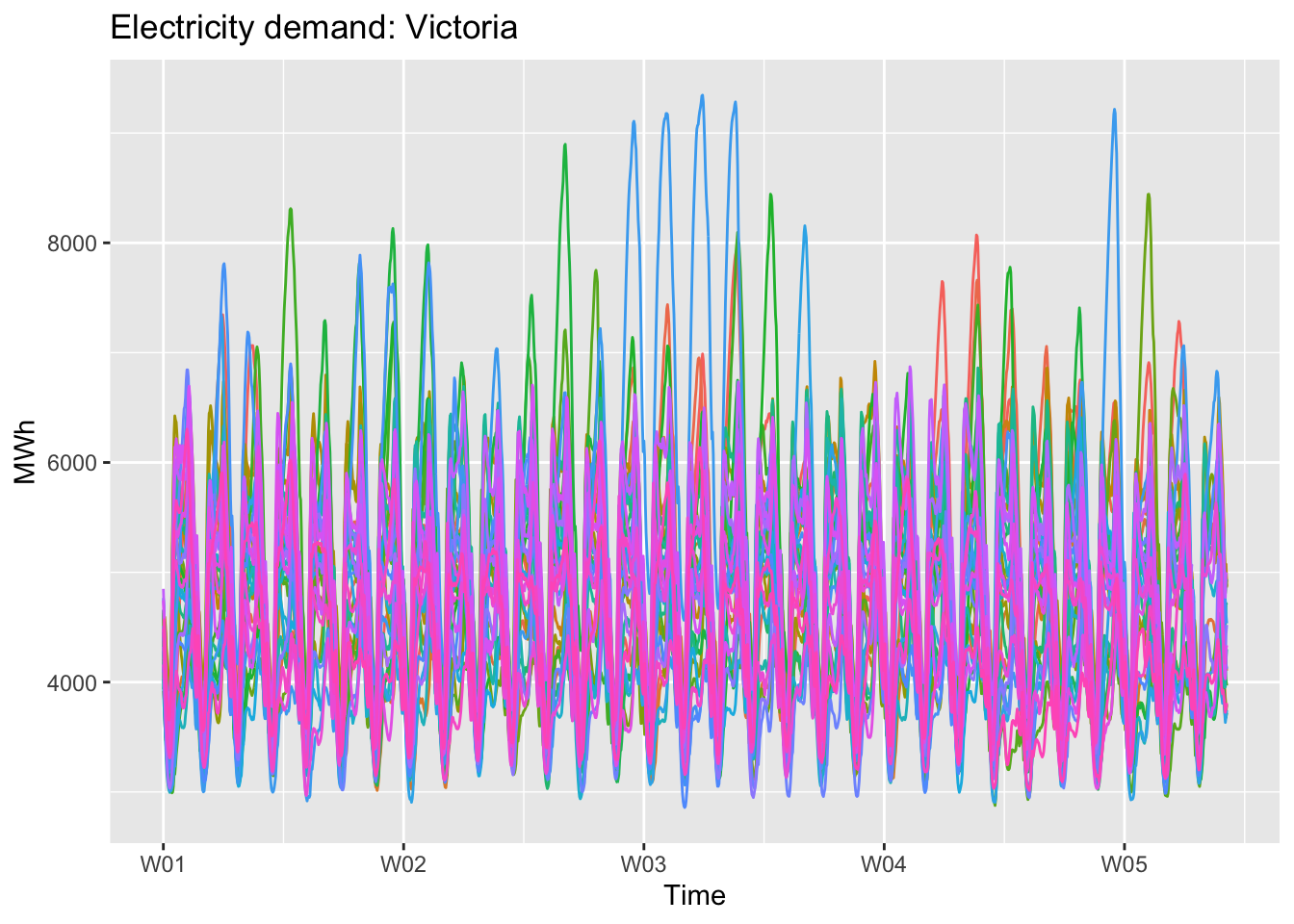
seasonal week plot:
Code
vic_elec |>gg_season(Demand, period ="month") +theme(legend.position ="none") +labs(y="MWh", title="Electricity demand: Victoria")
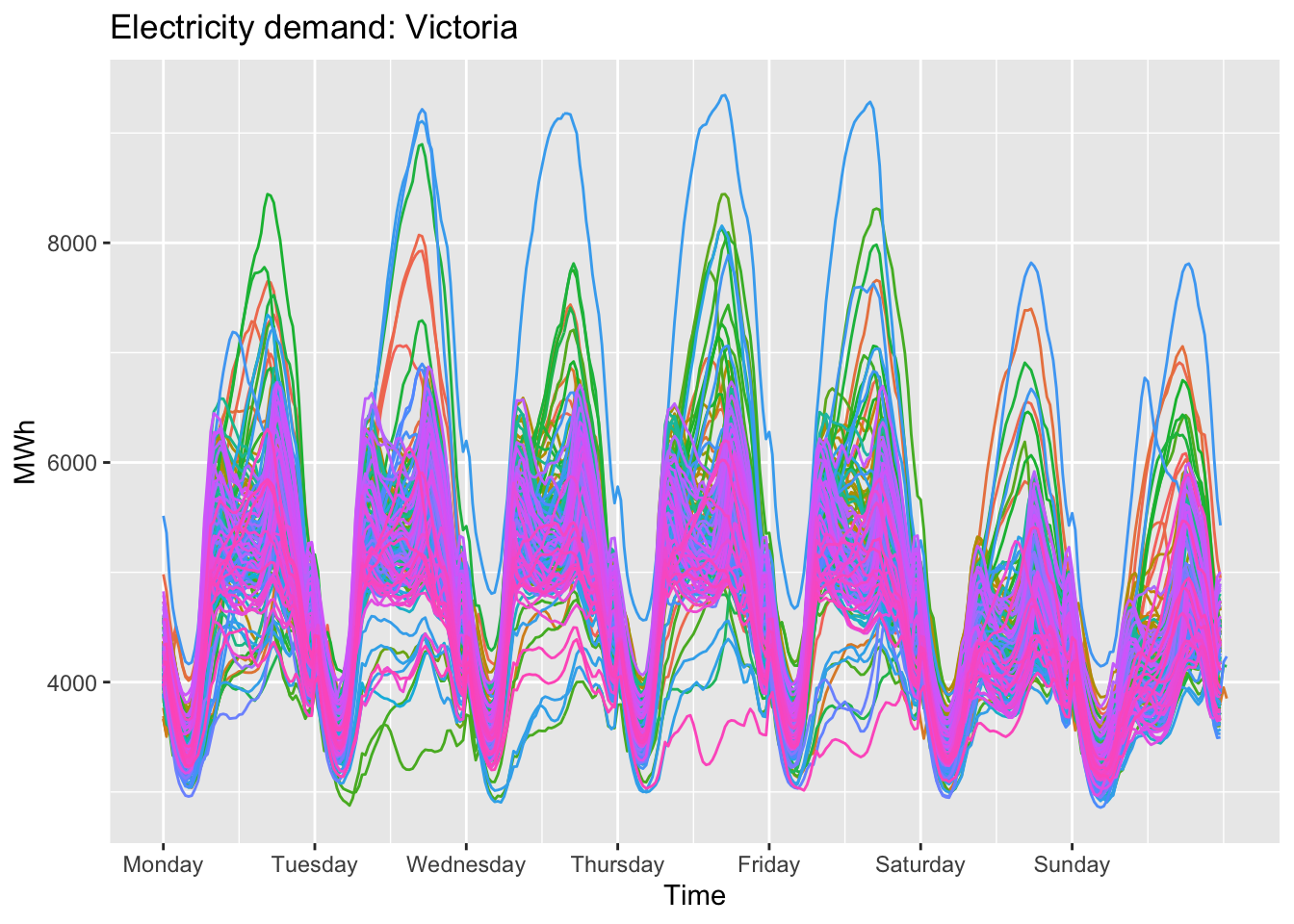
seasonal day plot:
Code
vic_elec |>gg_season(Demand, period ="week") +theme(legend.position ="none") +labs(y="MWh", title="Electricity demand: Victoria")
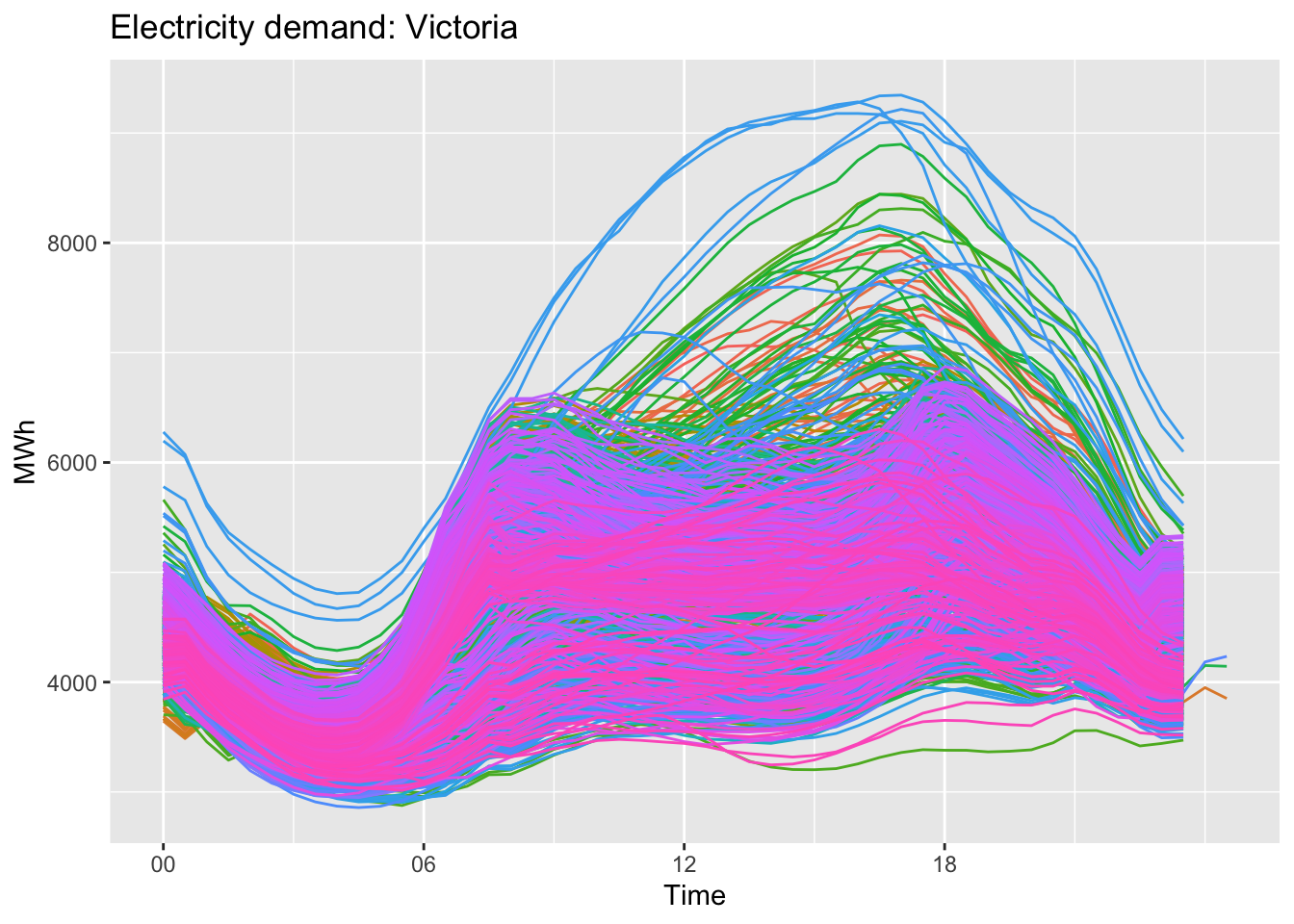
seasonal time plot:
Code
vic_elec |>gg_season(Demand, period ="day") +theme(legend.position ="none") +labs(y="MWh", title="Electricity demand: Victoria")
subseries plot:
Code
a10 %>%gg_subseries(Cost) +labs(y ="$ (millions)",title ="Australian antidiabetic drug sales" )
3 Reference
https://fable.tidyverts.org/
https://otexts.com/fpp3/index.html
Source Code
---title: "time series analysis"author: "Tony Duan"date: "2023-08-30"categories: [packages]execute: warning: false error: falseformat: html: toc: true code-fold: show code-tools: true number-sections: true code-block-bg: true code-block-border-left: "#31BAE9"---The basic steps in a forecasting task:Step 1: Problem definitionStep 2: Gathering informationStep 3: Preliminary (exploratory) analysisStep 4: Choosing and fitting modelsStep 5: Using and evaluating a forecasting model```{r}library(tidyverse)library(tidymodels)library(tsibble)library(tsibbledata)library(lubridate)library(dplyr)library(fpp3)```# data as tsibbleconvert data into tsibble```{r}weather <- nycflights13::weather %>%select(origin, time_hour, temp, humid, precip)weather_tsbl <-as_tsibble(weather, key = origin, index = time_hour)``````{r}head(weather_tsbl)```find index from tsibble```{r}index(weather_tsbl)```find key from tsibble```{r}key(weather_tsbl)```# plot time series data```{r}melsyd_economy <- ansett %>%filter(Airports =="MEL-SYD", Class =="Economy") %>%mutate(Passengers = Passengers/1000)``````{r}glimpse(melsyd_economy)``````{r}autoplot(melsyd_economy, Passengers) +labs(title ="Ansett airlines economy class",subtitle ="Melbourne-Sydney",y ="Passengers ('000)")``````{r}PBS |>filter(ATC2 =="A10") |>select(Month, Concession, Type, Cost) |>summarise(TotalC =sum(Cost)) |>mutate(Cost = TotalC /1e6) -> a10``````{r}autoplot(a10, Cost) +labs(y ="$ (millions)",title ="Australian antidiabetic drug sales")``````{r}glimpse(vic_elec)```seasonal month plot:```{r}vic_elec |>gg_season(Demand, period ="year") +theme(legend.position ="none") +labs(y="MWh", title="Electricity demand: Victoria")```seasonal week plot:```{r}vic_elec |>gg_season(Demand, period ="month") +theme(legend.position ="none") +labs(y="MWh", title="Electricity demand: Victoria")```seasonal day plot:```{r}vic_elec |>gg_season(Demand, period ="week") +theme(legend.position ="none") +labs(y="MWh", title="Electricity demand: Victoria")```seasonal time plot:```{r}vic_elec |>gg_season(Demand, period ="day") +theme(legend.position ="none") +labs(y="MWh", title="Electricity demand: Victoria")```subseries plot:```{r}a10 %>%gg_subseries(Cost) +labs(y ="$ (millions)",title ="Australian antidiabetic drug sales" )```# Time series components```{r}us_retail_employment <- us_employment |>filter(year(Month) >=1990, Title =="Retail Trade") |>select(-Series_ID)``````{r}components(dcmp) |>as_tsibble() |>autoplot(Employed, colour ="gray") +labs(y ="Persons (thousands)",title ="Total employment in US retail")``````{r}dcmp <- us_retail_employment |>model(stl =STL(Employed))``````{r}components(dcmp)``````{r}components(dcmp) %>%autoplot()```read data and trend data```{r}components(dcmp) |>as_tsibble() |>autoplot(Employed, colour="gray") +geom_line(aes(y=trend), colour ="#D55E00") +labs(y ="Persons (thousands)",title ="Total employment in US retail" )```read data and trend+remainder(removed seasonal effect) data```{r}components(dcmp) |>as_tsibble() |>autoplot(Employed, colour ="gray") +geom_line(aes(y=season_adjust), colour ="#0072B2") +labs(y ="Persons (thousands)",title ="Total employment in US retail")```# moving average```{r}global_economy |>filter(Country =="Australia") |>autoplot(Exports) +labs(y ="% of GDP", title ="Total Australian exports")```## 5 year moving average```{r}aus_exports <- global_economy |>filter(Country =="Australia") |>mutate(`5-MA`= slider::slide_dbl(Exports, mean,.before =2, .after =2, .complete =TRUE) )``````{r}aus_exports |>autoplot(Exports) +geom_line(aes(y =`5-MA`), colour ="#D55E00") +labs(y ="% of GDP",title ="Total Australian exports") +guides(colour =guide_legend(title ="series"))```# Classical decomposition methodtwo forms of classical decomposition: an additive decomposition and a multiplicative decomposition(developed in 1920s)```{r}us_retail_employment |>model(classical_decomposition(Employed, type ="additive") ) |>components() |>autoplot() +labs(title ="Classical additive decomposition of total US retail employment")```# X11 methodIts a multiplicative decomposition, whereas the STL and classical decompositions shown earlier were additive(developed in 1950s).Its only developed for quarterly and monthly data```{r}# install.packages("seasonal")x11_dcmp <- us_retail_employment |>model(x11 =X_13ARIMA_SEATS(Employed ~x11())) |>components()autoplot(x11_dcmp) +labs(title ="Decomposition of total US retail employment using X-11.")```# TRAMO/SEATS (developed in 1990s)```{r}seats_dcmp <- us_retail_employment |>model(seats =X_13ARIMA_SEATS(Employed ~seats())) |>components()autoplot(seats_dcmp) +labs(title ="Decomposition of total US retail employment using SEATS")```# STL(Seaonal and trend decompositiion) methodits additive model.(developed in 1950s)```{r}# robust = TRUE mean down weight (remove) outlier# window = "periodic" use all data us_retail_employment |>model(STL(Employed ~trend(window =7) +season(window ="periodic"),robust =TRUE)) |>components() |>autoplot()```default usual have good fit```{r}us_retail_employment |>model(STL(Employed)) |>components() |>autoplot()```# Some simple statistics```{r}tourism |>features(Trips, list(mean = mean)) |>arrange(mean)``````{r}tourism |>features(Trips, quantile)```Autocorrelations```{r}tourism |>features(Trips, feat_acf)```# forcast## data preparation```{r}gdppc <- global_economy |>mutate(GDP_per_capita = GDP / Population)head(gdppc)```## data ploting```{r}gdppc |>filter(Country =="Sweden") |>autoplot(GDP_per_capita) +labs(y ="$US", title ="GDP per capita for Sweden")```## Define a model```{r}TSLM(GDP_per_capita ~trend())```## fit the modelmable is model table```{r}fit <- gdppc |>model(trend_model =TSLM(GDP_per_capita ~trend()))fit```# Check model performance# Produce forecastsfable is forcast table```{r}#forcast futher 3 yearsfit |>forecast(h ="3 years")```plot the forcast```{r}fit |>forecast(h ="3 years") |>filter(Country =="Sweden") |>autoplot(gdppc) +labs(y ="$US", title ="GDP per capita for Sweden")```# some model```{r}bricks <- aus_production |>filter_index("1970 Q1"~"2004 Q4") |>select(Bricks)```## average model as benchmark```{r}bricks |>model(MEAN(Bricks))```## Naïve method```{r}bricks |>model(NAIVE(Bricks))```## Example: Australian quarterly beer production```{r}# Set training data from 1992 to 2006train <- aus_production %>%filter_index("1992 Q1"~"2006 Q4")# Fit the modelsbeer_fit <- train %>%model(Mean =MEAN(Beer),`Naïve`=NAIVE(Beer),`Seasonal naïve`=SNAIVE(Beer) )# Generate forecasts for 14 quartersbeer_fc <- beer_fit %>%forecast(h =14)# Plot forecasts against actual valuesbeer_fc %>%autoplot(train, level =NULL) +autolayer(filter_index(aus_production, "2007 Q1"~ .),colour ="black" ) +labs(y ="Megalitres",title ="Forecasts for quarterly beer production" ) +guides(colour =guide_legend(title ="Forecast"))```## Google’s daily closing stock price```{r}# Re-index based on trading daysgoogle_stock <- gafa_stock |>filter(Symbol =="GOOG", year(Date) >=2015) |>mutate(day =row_number()) |>update_tsibble(index = day, regular =TRUE)# Filter the year of interestgoogle_2015 <- google_stock |>filter(year(Date) ==2015)# Fit the modelsgoogle_fit <- google_2015 |>model(Mean =MEAN(Close),`Naïve`=NAIVE(Close),Drift =NAIVE(Close ~drift()) )# Produce forecasts for the trading days in January 2016google_jan_2016 <- google_stock |>filter(yearmonth(Date) ==yearmonth("2016 Jan"))google_fc <- google_fit |>forecast(new_data = google_jan_2016)# Plot the forecastsgoogle_fc |>autoplot(google_2015, level =NULL) +autolayer(google_jan_2016, Close, colour ="black") +labs(y ="$US",title ="Google daily closing stock prices",subtitle ="(Jan 2015 - Jan 2016)") +guides(colour =guide_legend(title ="Forecast"))```# Referencehttps://fable.tidyverts.org/https://otexts.com/fpp3/index.html